点击查看大图
点击查看大图
点击查看大图
点击查看大图
全面介绍
✨ Aether Monitor+: 智慧监控,轻松管理 ✨
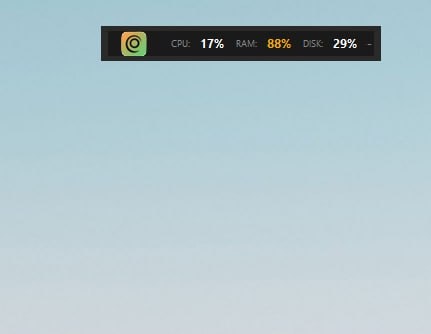
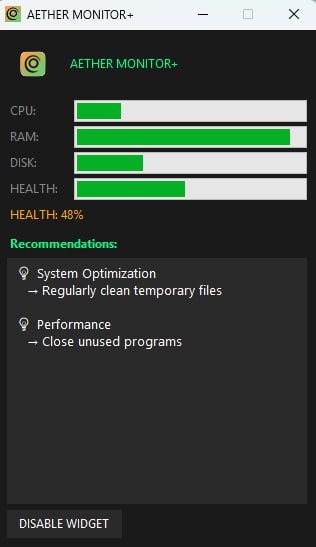
Aether Monitor+ 致力于在最低资源消耗下,为您提供实时系统状态监控,并智能推荐优化方案,助您更高效地管理设备。
“轻松监控,智慧推荐”—— 我们的核心理念,让复杂变得简单。
💡 功能亮点一览
- 实时系统监控: 全天候追踪您的设备状态,数据更新及时准确。
- 智能建议系统: 基于数据分析,提供个性化优化建议,提升您的管理效率。
- 资源消耗极低: 精心优化,确保监控过程不会成为系统负担。
🚀 快速上手,体验高效
我们让您快速融入 Aether Monitor+ 的智能世界:
- 轻松安装:
- 通过 pip 安装:
pip install git-quick - 从源码安装:
git clone <your-repo-url>cd git-quickpip install -e . - 智能助手配置(推荐):
- 支持Ollama(本地、免费):
curl -fsSL https://ollama.ai/install.sh | shollama pull llama3.2
Aether Monitor+ 将默认使用 Ollama。 - 支持OpenAI:
创建配置文件~/.gitquick.toml,并配置ai_provider = "openai"和openai_api_key。 - 如需跳过 AI,可使用
--no-ai标志。
简单三步,搞定日常操作:
- 进入您的 Git 仓库目录。
- 进行您的改动。
- 运行
gq,查看智能生成内容、确认并自动执行。
📋 核心命令行功能 (gq)
gq 命令是 Aether Monitor+ 的核心,它将多种功能集成到统一的接口中,让您的工作流更加流畅。
1. ⚡ 快速提交与推送 (gq)
快速创建并推送带有 AI 生成消息的提交。
- 交互式:
gq - 带自定义消息:
gq -m "feat: add new feature" - 不推送:
gq --no-push - 无 AI 生成:
gq --no-ai - 试运行(查看效果):
gq --dry-run
💡 AI 智能生成提交消息,省去您思考和编写的烦恼,高效又便捷!
2. 📚 提交历史查看 (gq story)
以美观格式展示您的提交历史。
- 查看最新发布以来的提交:
gq story - 按类型分组:
gq story --group-by type - 按作者分组:
gq story --group-by author - 导出为 Markdown:
gq story --format markdown > CHANGELOG.md
3. ⏱️ 时间追踪 (gq time)
追踪您在各个分支上花费的时间。
- 开始追踪当前分支:
gq time start - 停止追踪:
gq time stop - 查看所有分支报告:
gq time report --all
4. 🔄 分支同步 (gq sync)
一键更新所有本地分支,保持与远程仓库同步。
- 同步所有分支:
gq sync - 试运行(预览):
gq sync --dry-run
🛠️ 高级配置与扩展
⚙️ 定制化配置 (.gitquick.toml)
Aether Monitor+ 允许您通过 ~/.gitquick.toml (全局) 或 .gitquick.toml (项目级) 文件进行深度配置,满足您的个性化需求。
- 自动推送:
auto_push = true - 表情符号风格:
emoji_style = "gitmoji" - AI 提供者:
ai_provider = "ollama" - 提交历史分组:
group_by = "date" - 自动追踪时间:
auto_track = true
🔗 与 VS Code 深度整合
如果您是 VS Code 用户,Aether Monitor+ 为您提供了无缝的集成体验:
- 命令面板: 通过
Cmd/Ctrl + Shift + P访问各项功能。 - 快捷键:
Ctrl+Shift+G Q- 快速提交与推送Ctrl+Shift+G M- 生成 AI 提交消息
- Source Control 视图: 直观的按钮和状态栏快速访问。
📝 自定义模板
在 ~/.gitquick/templates/ 中创建自定义提交消息模板,例如:
# ~/.gitquick/templates/feature.txt
feat({{scope}}): {{description}}

## Changes
- {{change1}}
- {{change2}}

## Testing
{{testing}}
然后使用 gq --template feature 应用。
🤝 贡献与支持
Aether Monitor+ 秉承 MIT 许可协议,欢迎您的贡献!
- 发现 Bug? 请在 GitHub Issues 中报告。
- 有新想法? 在 Discussions 中发起讨论。
- 贡献指南: 查阅 CONTRIBUTING.md 了解如何参与。
我们期待与您共同打造更优秀的 Aether Monitor+! ❤️
产品评分
暂无评分
登录后即可评分